[English](https://github.com/rrousselGit/provider/blob/master/packages/provider/README.md) | [French](https://github.com/rrousselGit/provider/blob/master/resources/translations/fr_FR/README.md) | [Português](https://github.com/rrousselGit/provider/blob/master/resources/translations/pt_br/README.md) | [简体中文](https://github.com/rrousselGit/provider/blob/master/resources/translations/zh-CN/README.md) | [Español](https://github.com/rrousselGit/provider/blob/master/resources/translations/es_MX/README.md) | [한국어](https://github.com/rrousselGit/provider/blob/master/resources/translations/ko-KR/README.md) | [বাংলা](https://github.com/rrousselGit/provider/blob/master/resources/translations/bn_BD/README.md) | [日本語](https://github.com/rrousselGit/provider/blob/master/resources/translations/ja_JP/README.md) | [Turkish](https://github.com/rrousselGit/provider/blob/master/resources/translations/tr_TR/README.md)
 [](https://codecov.io/gh/rrousselGit/provider)
[](https://codecov.io/gh/rrousselGit/provider)  [
[ ](https://flutter.dev/docs/development/packages-and-plugins/favorites)
A wrapper around [InheritedWidget]
to make them easier to use and more reusable.
By using `provider` instead of manually writing [InheritedWidget], you get:
- simplified allocation/disposal of resources
- lazy-loading
- a vastly reduced boilerplate over making a new class every time
- devtool friendly – using Provider, the state of your application will be visible in the Flutter devtool
- a common way to consume these [InheritedWidget]s (See [Provider.of]/[Consumer]/[Selector])
- increased scalability for classes with a listening mechanism that grows exponentially
in complexity (such as [ChangeNotifier], which is O(N) for dispatching notifications).
To read more about a `provider`, see its [documentation](https://pub.dev/documentation/provider/latest/provider/provider-library.html).
See also:
- [The official Flutter state management documentation](https://flutter.dev/docs/development/data-and-backend/state-mgmt/simple), which showcases how to use `provider` + [ChangeNotifier]
- [flutter architecture sample](https://github.com/brianegan/flutter_architecture_samples/tree/master/change_notifier_provider), which contains an implementation of that app using `provider` + [ChangeNotifier]
- [flutter_bloc](https://github.com/felangel/bloc) and [Mobx](https://github.com/mobxjs/mobx.dart), which uses a `provider` in their architecture
## Migration from 4.x.x to 5.0.0-nullsafety
- `initialData` for both `FutureProvider` and `StreamProvider` is now required.
To migrate, what used to be:
```dart
FutureProvider(
create: (context) => Future.value(42),
child: MyApp(),
)
Widget build(BuildContext context) {
final value = context.watch();
return Text('$value');
}
```
is now:
```dart
FutureProvider(
initialValue: null,
create: (context) => Future.value(42),
child: MyApp(),
)
Widget build(BuildContext context) {
// be sure to specify the ? in watch
final value = context.watch();
return Text('$value');
}
```
- `ValueListenableProvider` is removed
To migrate, you can instead use `Provider` combined with `ValueListenableBuilder`:
```dart
ValueListenableBuilder(
valueListenable: myValueListenable,
builder: (context, value, _) {
return Provider.value(
value: value,
child: MyApp(),
);
}
)
```
## Usage
### Exposing a value
#### Exposing a new object instance
Providers allow you to not only expose a value, but also create, listen, and dispose of it.
To expose a newly created object, use the default constructor of a provider.
Do _not_ use the `.value` constructor if you want to **create** an object, or you
may otherwise have undesired side effects.
See [this StackOverflow answer](https://stackoverflow.com/questions/52249578/how-to-deal-with-unwanted-widget-build)
which explains why using the `.value` constructor to create values is undesired.
- **DO** create a new object inside `create`.
```dart
Provider(
create: (_) => MyModel(),
child: ...
)
```
- **DON'T** use `Provider.value` to create your object.
```dart
ChangeNotifierProvider.value(
value: MyModel(),
child: ...
)
```
- **DON'T** create your object from variables that can change over time.
In such a situation, your object would never update when the
value changes.
```dart
int count;
Provider(
create: (_) => MyModel(count),
child: ...
)
```
If you want to pass variables that can change over time to your object,
consider using `ProxyProvider`:
```dart
int count;
ProxyProvider0(
update: (_, __) => MyModel(count),
child: ...
)
```
**NOTE**:
When using the `create`/`update` callback of a provider, it is worth noting that this callback
is called lazily by default.
This means that until the value is requested at least once, the `create`/`update` callbacks won't be called.
This behavior can be disabled if you want to pre-compute some logic, using the `lazy` parameter:
```dart
MyProvider(
create: (_) => Something(),
lazy: false,
)
```
#### Reusing an existing object instance:
If you already have an object instance and want to expose it, it would be best to use the `.value` constructor of a provider.
Failing to do so may call your object `dispose` method when it is still in use.
- **DO** use `ChangeNotifierProvider.value` to provide an existing
[ChangeNotifier].
```dart
MyChangeNotifier variable;
ChangeNotifierProvider.value(
value: variable,
child: ...
)
```
- **DON'T** reuse an existing [ChangeNotifier] using the default constructor
```dart
MyChangeNotifier variable;
ChangeNotifierProvider(
create: (_) => variable,
child: ...
)
```
### Reading a value
The easiest way to read a value is by using the extension methods on [BuildContext]:
- `context.watch()`, which makes the widget listen to changes on `T`
- `context.read()`, which returns `T` without listening to it
- `context.select(R cb(T value))`, which allows a widget to listen to only a small part of `T`.
One can also use the static method `Provider.of(context)`, which will behave similarly
to `watch`. When the `listen` parameter is set to `false` (as in `Provider.of(context, listen: false)`), then
it will behave similarly to `read`.
It's worth noting that `context.read()` won't make a widget rebuild when the value
changes and it cannot be called inside `StatelessWidget.build`/`State.build`.
On the other hand, it can be freely called outside of these methods.
These methods will look up in the widget tree starting from the widget associated
with the `BuildContext` passed and will return the nearest variable of type `T`
found (or throw if nothing is found).
This operation is O(1). It doesn't involve walking in the widget tree.
Combined with the first example of [exposing a value](#exposing-a-value), this widget will read the exposed `String` and render "Hello World."
```dart
class Home extends StatelessWidget {
@override
Widget build(BuildContext context) {
return Text(
// Don't forget to pass the type of the object you want to obtain to `watch`!
context.watch(),
);
}
}
```
Alternatively, instead of using these methods, we can use [Consumer] and [Selector].
These can be useful for performance optimizations or when it is difficult to
obtain a `BuildContext` descendant of the provider.
See the [FAQ](https://github.com/rrousselGit/provider#my-widget-rebuilds-too-often-what-can-i-do)
or the documentation of [Consumer](https://pub.dev/documentation/provider/latest/provider/Consumer-class.html)
and [Selector](https://pub.dev/documentation/provider/latest/provider/Selector-class.html)
for more information.
### Optionally depending on a provider
Sometimes, we may want to support cases where a provider does not exist. An
example would be for reusable widgets that could be used in various locations,
including outside of a provider.
To do so, when calling `context.watch`/`context.read`, make the generic type
nullable. Such that instead of:
```dart
context.watch()
```
which will throw a `ProviderNotFoundException` if no matching providers
are found, do:
```dart
context.watch()
```
which will try to obtain a matching provider. But if none are found,
`null` will be returned instead of throwing.
### MultiProvider
When injecting many values in big applications, `Provider` can rapidly become
pretty nested:
```dart
Provider(
create: (_) => Something(),
child: Provider(
create: (_) => SomethingElse(),
child: Provider(
create: (_) => AnotherThing(),
child: someWidget,
),
),
),
```
To:
```dart
MultiProvider(
providers: [
Provider(create: (_) => Something()),
Provider(create: (_) => SomethingElse()),
Provider(create: (_) => AnotherThing()),
],
child: someWidget,
)
```
The behavior of both examples is strictly the same. `MultiProvider` only changes
the appearance of the code.
### ProxyProvider
Since the 3.0.0, there is a new kind of provider: `ProxyProvider`.
`ProxyProvider` is a provider that combines multiple values from other providers into a new object and sends the result to `Provider`.
That new object will then be updated whenever one of the provider we depend on gets updated.
The following example uses `ProxyProvider` to build translations based on a counter coming from another provider.
```dart
Widget build(BuildContext context) {
return MultiProvider(
providers: [
ChangeNotifierProvider(create: (_) => Counter()),
ProxyProvider(
update: (_, counter, __) => Translations(counter.value),
),
],
child: Foo(),
);
}
class Translations {
const Translations(this._value);
final int _value;
String get title => 'You clicked $_value times';
}
```
It comes under multiple variations, such as:
- `ProxyProvider` vs `ProxyProvider2` vs `ProxyProvider3`, ...
That digit after the class name is the number of other providers that
`ProxyProvider` depends on.
- `ProxyProvider` vs `ChangeNotifierProxyProvider` vs `ListenableProxyProvider`, ...
They all work similarly, but instead of sending the result into a `Provider`,
a `ChangeNotifierProxyProvider` will send its value to a `ChangeNotifierProvider`.
### FAQ
#### Can I inspect the content of my objects?
Flutter comes with a [devtool](https://github.com/flutter/devtools) that shows
what the widget tree is at a given moment.
Since providers are widgets, they are also visible in that devtool:
](https://flutter.dev/docs/development/packages-and-plugins/favorites)
A wrapper around [InheritedWidget]
to make them easier to use and more reusable.
By using `provider` instead of manually writing [InheritedWidget], you get:
- simplified allocation/disposal of resources
- lazy-loading
- a vastly reduced boilerplate over making a new class every time
- devtool friendly – using Provider, the state of your application will be visible in the Flutter devtool
- a common way to consume these [InheritedWidget]s (See [Provider.of]/[Consumer]/[Selector])
- increased scalability for classes with a listening mechanism that grows exponentially
in complexity (such as [ChangeNotifier], which is O(N) for dispatching notifications).
To read more about a `provider`, see its [documentation](https://pub.dev/documentation/provider/latest/provider/provider-library.html).
See also:
- [The official Flutter state management documentation](https://flutter.dev/docs/development/data-and-backend/state-mgmt/simple), which showcases how to use `provider` + [ChangeNotifier]
- [flutter architecture sample](https://github.com/brianegan/flutter_architecture_samples/tree/master/change_notifier_provider), which contains an implementation of that app using `provider` + [ChangeNotifier]
- [flutter_bloc](https://github.com/felangel/bloc) and [Mobx](https://github.com/mobxjs/mobx.dart), which uses a `provider` in their architecture
## Migration from 4.x.x to 5.0.0-nullsafety
- `initialData` for both `FutureProvider` and `StreamProvider` is now required.
To migrate, what used to be:
```dart
FutureProvider(
create: (context) => Future.value(42),
child: MyApp(),
)
Widget build(BuildContext context) {
final value = context.watch();
return Text('$value');
}
```
is now:
```dart
FutureProvider(
initialValue: null,
create: (context) => Future.value(42),
child: MyApp(),
)
Widget build(BuildContext context) {
// be sure to specify the ? in watch
final value = context.watch();
return Text('$value');
}
```
- `ValueListenableProvider` is removed
To migrate, you can instead use `Provider` combined with `ValueListenableBuilder`:
```dart
ValueListenableBuilder(
valueListenable: myValueListenable,
builder: (context, value, _) {
return Provider.value(
value: value,
child: MyApp(),
);
}
)
```
## Usage
### Exposing a value
#### Exposing a new object instance
Providers allow you to not only expose a value, but also create, listen, and dispose of it.
To expose a newly created object, use the default constructor of a provider.
Do _not_ use the `.value` constructor if you want to **create** an object, or you
may otherwise have undesired side effects.
See [this StackOverflow answer](https://stackoverflow.com/questions/52249578/how-to-deal-with-unwanted-widget-build)
which explains why using the `.value` constructor to create values is undesired.
- **DO** create a new object inside `create`.
```dart
Provider(
create: (_) => MyModel(),
child: ...
)
```
- **DON'T** use `Provider.value` to create your object.
```dart
ChangeNotifierProvider.value(
value: MyModel(),
child: ...
)
```
- **DON'T** create your object from variables that can change over time.
In such a situation, your object would never update when the
value changes.
```dart
int count;
Provider(
create: (_) => MyModel(count),
child: ...
)
```
If you want to pass variables that can change over time to your object,
consider using `ProxyProvider`:
```dart
int count;
ProxyProvider0(
update: (_, __) => MyModel(count),
child: ...
)
```
**NOTE**:
When using the `create`/`update` callback of a provider, it is worth noting that this callback
is called lazily by default.
This means that until the value is requested at least once, the `create`/`update` callbacks won't be called.
This behavior can be disabled if you want to pre-compute some logic, using the `lazy` parameter:
```dart
MyProvider(
create: (_) => Something(),
lazy: false,
)
```
#### Reusing an existing object instance:
If you already have an object instance and want to expose it, it would be best to use the `.value` constructor of a provider.
Failing to do so may call your object `dispose` method when it is still in use.
- **DO** use `ChangeNotifierProvider.value` to provide an existing
[ChangeNotifier].
```dart
MyChangeNotifier variable;
ChangeNotifierProvider.value(
value: variable,
child: ...
)
```
- **DON'T** reuse an existing [ChangeNotifier] using the default constructor
```dart
MyChangeNotifier variable;
ChangeNotifierProvider(
create: (_) => variable,
child: ...
)
```
### Reading a value
The easiest way to read a value is by using the extension methods on [BuildContext]:
- `context.watch()`, which makes the widget listen to changes on `T`
- `context.read()`, which returns `T` without listening to it
- `context.select(R cb(T value))`, which allows a widget to listen to only a small part of `T`.
One can also use the static method `Provider.of(context)`, which will behave similarly
to `watch`. When the `listen` parameter is set to `false` (as in `Provider.of(context, listen: false)`), then
it will behave similarly to `read`.
It's worth noting that `context.read()` won't make a widget rebuild when the value
changes and it cannot be called inside `StatelessWidget.build`/`State.build`.
On the other hand, it can be freely called outside of these methods.
These methods will look up in the widget tree starting from the widget associated
with the `BuildContext` passed and will return the nearest variable of type `T`
found (or throw if nothing is found).
This operation is O(1). It doesn't involve walking in the widget tree.
Combined with the first example of [exposing a value](#exposing-a-value), this widget will read the exposed `String` and render "Hello World."
```dart
class Home extends StatelessWidget {
@override
Widget build(BuildContext context) {
return Text(
// Don't forget to pass the type of the object you want to obtain to `watch`!
context.watch(),
);
}
}
```
Alternatively, instead of using these methods, we can use [Consumer] and [Selector].
These can be useful for performance optimizations or when it is difficult to
obtain a `BuildContext` descendant of the provider.
See the [FAQ](https://github.com/rrousselGit/provider#my-widget-rebuilds-too-often-what-can-i-do)
or the documentation of [Consumer](https://pub.dev/documentation/provider/latest/provider/Consumer-class.html)
and [Selector](https://pub.dev/documentation/provider/latest/provider/Selector-class.html)
for more information.
### Optionally depending on a provider
Sometimes, we may want to support cases where a provider does not exist. An
example would be for reusable widgets that could be used in various locations,
including outside of a provider.
To do so, when calling `context.watch`/`context.read`, make the generic type
nullable. Such that instead of:
```dart
context.watch()
```
which will throw a `ProviderNotFoundException` if no matching providers
are found, do:
```dart
context.watch()
```
which will try to obtain a matching provider. But if none are found,
`null` will be returned instead of throwing.
### MultiProvider
When injecting many values in big applications, `Provider` can rapidly become
pretty nested:
```dart
Provider(
create: (_) => Something(),
child: Provider(
create: (_) => SomethingElse(),
child: Provider(
create: (_) => AnotherThing(),
child: someWidget,
),
),
),
```
To:
```dart
MultiProvider(
providers: [
Provider(create: (_) => Something()),
Provider(create: (_) => SomethingElse()),
Provider(create: (_) => AnotherThing()),
],
child: someWidget,
)
```
The behavior of both examples is strictly the same. `MultiProvider` only changes
the appearance of the code.
### ProxyProvider
Since the 3.0.0, there is a new kind of provider: `ProxyProvider`.
`ProxyProvider` is a provider that combines multiple values from other providers into a new object and sends the result to `Provider`.
That new object will then be updated whenever one of the provider we depend on gets updated.
The following example uses `ProxyProvider` to build translations based on a counter coming from another provider.
```dart
Widget build(BuildContext context) {
return MultiProvider(
providers: [
ChangeNotifierProvider(create: (_) => Counter()),
ProxyProvider(
update: (_, counter, __) => Translations(counter.value),
),
],
child: Foo(),
);
}
class Translations {
const Translations(this._value);
final int _value;
String get title => 'You clicked $_value times';
}
```
It comes under multiple variations, such as:
- `ProxyProvider` vs `ProxyProvider2` vs `ProxyProvider3`, ...
That digit after the class name is the number of other providers that
`ProxyProvider` depends on.
- `ProxyProvider` vs `ChangeNotifierProxyProvider` vs `ListenableProxyProvider`, ...
They all work similarly, but instead of sending the result into a `Provider`,
a `ChangeNotifierProxyProvider` will send its value to a `ChangeNotifierProvider`.
### FAQ
#### Can I inspect the content of my objects?
Flutter comes with a [devtool](https://github.com/flutter/devtools) that shows
what the widget tree is at a given moment.
Since providers are widgets, they are also visible in that devtool:
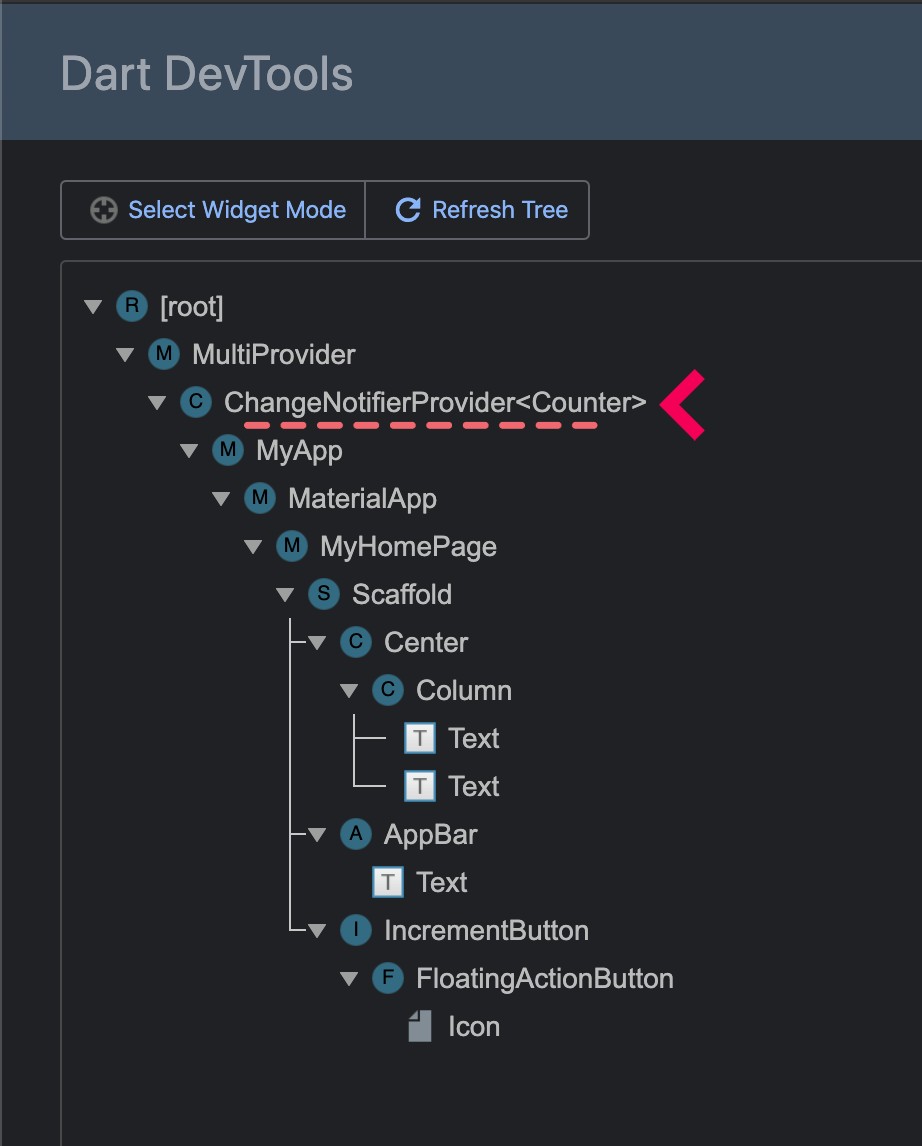 From there, if you click on one provider, you will be able to see the value it exposes:
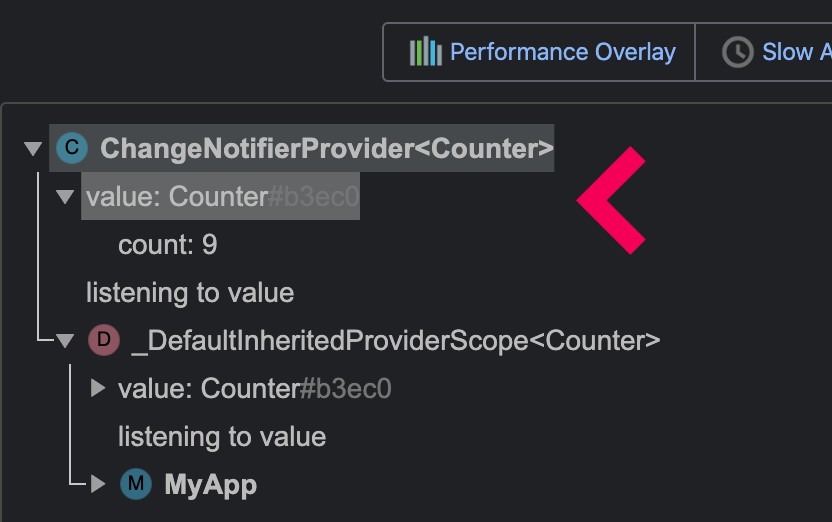 (screenshot of the devtools using the `example` folder)
#### The devtool only shows "Instance of MyClass". What can I do?
By default, the devtool relies on `toString`, which defaults to "Instance of MyClass".
To have something more useful, you have two solutions:
- use the [Diagnosticable](https://api.flutter.dev/flutter/foundation/Diagnosticable-mixin.html) API from Flutter.
For most cases, I will use [DiagnosticableTreeMixin] on your objects, followed by a custom implementation of [debugFillProperties](https://api.flutter.dev/flutter/foundation/DiagnosticableTreeMixin/debugFillProperties.html).
```dart
class MyClass with DiagnosticableTreeMixin {
MyClass({this.a, this.b});
final int a;
final String b;
@override
void debugFillProperties(DiagnosticPropertiesBuilder properties) {
super.debugFillProperties(properties);
// list all the properties of your class here.
// See the documentation of debugFillProperties for more information.
properties.add(IntProperty('a', a));
properties.add(StringProperty('b', b));
}
}
```
- Override `toString`.
If you cannot use [DiagnosticableTreeMixin] (like if your class is in a package
that does not depend on Flutter), then you can override `toString`.
This is easier than using [DiagnosticableTreeMixin] but is less powerful:
You will not be able to expand/collapse the details of your object.
```dart
class MyClass with DiagnosticableTreeMixin {
MyClass({this.a, this.b});
final int a;
final String b;
@override
String toString() {
return '$runtimeType(a: $a, b: $b)';
}
}
```
#### I have an exception when obtaining Providers inside `initState`. What can I do?
This exception happens because you're trying to listen to a provider from a
life-cycle that will never ever be called again.
It means that you either should use another life-cycle (`build`), or explicitly
specify that you do not care about updates.
As such, instead of:
```dart
initState() {
super.initState();
print(context.watch().value);
}
```
you can do:
```dart
Value value;
Widget build(BuildContext context) {
final value = context.watch().value;
if (value != this.value) {
this.value = value;
print(value);
}
}
```
which will print `value` whenever it changes (and only when it changes).
Alternatively, you can do:
```dart
initState() {
super.initState();
print(context.read().value);
}
```
Which will print `value` once _and ignore updates._
#### How to handle hot-reload on my objects?
You can make your provided object implement `ReassembleHandler`:
```dart
class Example extends ChangeNotifier implements ReassembleHandler {
@override
void reassemble() {
print('Did hot-reload');
}
}
```
Then used typically with `provider`:
```dart
ChangeNotifierProvider(create: (_) => Example()),
```
#### I use [ChangeNotifier], and I have an exception when I update it. What happens?
This likely happens because you are modifying the [ChangeNotifier] from one of its descendants _while the widget tree is building_.
A typical situation where this happens is when starting an http request, where the future is stored inside the notifier:
```dart
initState() {
super.initState();
context.read().fetchSomething();
}
```
This is not allowed because the state update is synchronous.
This means that some widgets may build _before_ the mutation happens (getting an old value), while other widgets will build _after_ the mutation is complete (getting a new value). This could cause inconsistencies in your UI and is therefore not allowed.
Instead, you should perform that mutation in a place that would affect the
entire tree equally:
- directly inside the `create` of your provider/constructor of your model:
```dart
class MyNotifier with ChangeNotifier {
MyNotifier() {
_fetchSomething();
}
Future _fetchSomething() async {}
}
```
This is useful when there's no "external parameter".
- asynchronously at the end of the frame:
```dart
initState() {
super.initState();
Future.microtask(() =>
context.read().fetchSomething(someValue);
);
}
```
It is slightly less ideal, but allows passing parameters to the mutation.
#### Do I have to use [ChangeNotifier] for complex states?
No.
You can use any object to represent your state. For example, an alternate
architecture is to use `Provider.value()` combined with a `StatefulWidget`.
Here's a counter example using such architecture:
```dart
class Example extends StatefulWidget {
const Example({Key key, this.child}) : super(key: key);
final Widget child;
@override
ExampleState createState() => ExampleState();
}
class ExampleState extends State {
int _count;
void increment() {
setState(() {
_count++;
});
}
@override
Widget build(BuildContext context) {
return Provider.value(
value: _count,
child: Provider.value(
value: this,
child: widget.child,
),
);
}
}
```
where we can read the state by doing:
```dart
return Text(context.watch().toString());
```
and modify the state with:
```dart
return FloatingActionButton(
onPressed: () => context.read().increment(),
child: Icon(Icons.plus_one),
);
```
Alternatively, you can create your own provider.
#### Can I make my Provider?
Yes. `provider` exposes all the small components that make a fully-fledged provider.
This includes:
- `SingleChildStatelessWidget`, to make any widget works with `MultiProvider`.
This interface is exposed as part of `package:provider/single_child_widget`
- [InheritedProvider], the generic `InheritedWidget` obtained when doing `context.watch`.
Here's an example of a custom provider to use `ValueNotifier` as the state:
https://gist.github.com/rrousselGit/4910f3125e41600df3c2577e26967c91
#### My widget rebuilds too often. What can I do?
Instead of `context.watch`, you can use `context.select` to listen only to the specific set of properties on the obtained object.
For example, while you can write:
```dart
Widget build(BuildContext context) {
final person = context.watch();
return Text(person.name);
}
```
It may cause the widget to rebuild if something other than `name` changes.
Instead, you can use `context.select` to listen only to the `name` property:
```dart
Widget build(BuildContext context) {
final name = context.select((Person p) => p.name);
return Text(name);
}
```
This way, the widget won't unnecessarily rebuild if something other than `name` changes.
Similarly, you can use [Consumer]/[Selector]. Their optional `child` argument allows rebuilding only a particular part of the widget tree:
```dart
Foo(
child: Consumer(
builder: (_, a, child) {
return Bar(a: a, child: child);
},
child: Baz(),
),
)
```
In this example, only `Bar` will rebuild when `A` updates. `Foo` and `Baz` won't
unnecessarily rebuild.
#### Can I obtain two different providers using the same type?
No. While you can have multiple providers sharing the same type, a widget will be able to obtain only one of them: the closest ancestor.
Instead, it would help if you explicitly gave both providers a different type.
Instead of:
```dart
Provider(
create: (_) => 'England',
child: Provider(
create: (_) => 'London',
child: ...,
),
),
```
Prefer:
```dart
Provider(
create: (_) => Country('England'),
child: Provider(
create: (_) => City('London'),
child: ...,
),
),
```
#### Can I consume an interface and provide an implementation?
Yes, a type hint must be given to the compiler to indicate the interface will be consumed, with the implementation provided in create.
```dart
abstract class ProviderInterface with ChangeNotifier {
...
}
class ProviderImplementation with ChangeNotifier implements ProviderInterface {
...
}
class Foo extends StatelessWidget {
@override
build(context) {
final provider = Provider.of(context);
return ...
}
}
ChangeNotifierProvider(
create: (_) => ProviderImplementation(),
child: Foo(),
),
```
### Existing providers
`provider` exposes a few different kinds of "provider" for different types of objects.
The complete list of all the objects available is [here](https://pub.dev/documentation/provider/latest/provider/provider-library.html)
| name | description |
| ----------------------------------------------------------------------------------------------------------------------------- | ---------------------------------------------------------------------------------------------------------------------------------------------------------------------- |
| [Provider](https://pub.dartlang.org/documentation/provider/latest/provider/Provider-class.html) | The most basic form of provider. It takes a value and exposes it, whatever the value is. |
| [ListenableProvider](https://pub.dartlang.org/documentation/provider/latest/provider/ListenableProvider-class.html) | A specific provider for Listenable object. ListenableProvider will listen to the object and ask widgets which depend on it to rebuild whenever the listener is called. |
| [ChangeNotifierProvider](https://pub.dartlang.org/documentation/provider/latest/provider/ChangeNotifierProvider-class.html) | A specification of ListenableProvider for ChangeNotifier. It will automatically call `ChangeNotifier.dispose` when needed. |
| [ValueListenableProvider](https://pub.dartlang.org/documentation/provider/latest/provider/ValueListenableProvider-class.html) | Listen to a ValueListenable and only expose `ValueListenable.value`. |
| [StreamProvider](https://pub.dartlang.org/documentation/provider/latest/provider/StreamProvider-class.html) | Listen to a Stream and expose the latest value emitted. |
| [FutureProvider](https://pub.dartlang.org/documentation/provider/latest/provider/FutureProvider-class.html) | Takes a `Future` and updates dependents when the future completes. |
### My application throws a StackOverflowError because I have too many providers, what can I do?
If you have a very large number of providers (150+), it is possible that some devices will throw a `StackOverflowError` because you end-up building too many widgets at once.
In this situation, you have a few solutions:
- If your application has a splash-screen, try mounting your providers over time instead of all at once.
You could do:
```dart
MultiProvider(
providers: [
if (step1) ...[
,
],
if (step2) ...[
]
],
)
```
where during your splash screen animation, you would do:
```dart
bool step1 = false;
bool step2 = false;
@override
initState() {
super.initState();
Future(() {
setState(() => step1 = true);
Future(() {
setState(() => step2 = true);
});
});
}
```
- Consider opting out of using `MultiProvider`.
`MultiProvider` works by adding a widget between every providers. Not using `MultiProvider` can
increase the limit before a `StackOverflowError` is reached.
## Sponsors
(screenshot of the devtools using the `example` folder)
#### The devtool only shows "Instance of MyClass". What can I do?
By default, the devtool relies on `toString`, which defaults to "Instance of MyClass".
To have something more useful, you have two solutions:
- use the [Diagnosticable](https://api.flutter.dev/flutter/foundation/Diagnosticable-mixin.html) API from Flutter.
For most cases, I will use [DiagnosticableTreeMixin] on your objects, followed by a custom implementation of [debugFillProperties](https://api.flutter.dev/flutter/foundation/DiagnosticableTreeMixin/debugFillProperties.html).
```dart
class MyClass with DiagnosticableTreeMixin {
MyClass({this.a, this.b});
final int a;
final String b;
@override
void debugFillProperties(DiagnosticPropertiesBuilder properties) {
super.debugFillProperties(properties);
// list all the properties of your class here.
// See the documentation of debugFillProperties for more information.
properties.add(IntProperty('a', a));
properties.add(StringProperty('b', b));
}
}
```
- Override `toString`.
If you cannot use [DiagnosticableTreeMixin] (like if your class is in a package
that does not depend on Flutter), then you can override `toString`.
This is easier than using [DiagnosticableTreeMixin] but is less powerful:
You will not be able to expand/collapse the details of your object.
```dart
class MyClass with DiagnosticableTreeMixin {
MyClass({this.a, this.b});
final int a;
final String b;
@override
String toString() {
return '$runtimeType(a: $a, b: $b)';
}
}
```
#### I have an exception when obtaining Providers inside `initState`. What can I do?
This exception happens because you're trying to listen to a provider from a
life-cycle that will never ever be called again.
It means that you either should use another life-cycle (`build`), or explicitly
specify that you do not care about updates.
As such, instead of:
```dart
initState() {
super.initState();
print(context.watch().value);
}
```
you can do:
```dart
Value value;
Widget build(BuildContext context) {
final value = context.watch().value;
if (value != this.value) {
this.value = value;
print(value);
}
}
```
which will print `value` whenever it changes (and only when it changes).
Alternatively, you can do:
```dart
initState() {
super.initState();
print(context.read().value);
}
```
Which will print `value` once _and ignore updates._
#### How to handle hot-reload on my objects?
You can make your provided object implement `ReassembleHandler`:
```dart
class Example extends ChangeNotifier implements ReassembleHandler {
@override
void reassemble() {
print('Did hot-reload');
}
}
```
Then used typically with `provider`:
```dart
ChangeNotifierProvider(create: (_) => Example()),
```
#### I use [ChangeNotifier], and I have an exception when I update it. What happens?
This likely happens because you are modifying the [ChangeNotifier] from one of its descendants _while the widget tree is building_.
A typical situation where this happens is when starting an http request, where the future is stored inside the notifier:
```dart
initState() {
super.initState();
context.read().fetchSomething();
}
```
This is not allowed because the state update is synchronous.
This means that some widgets may build _before_ the mutation happens (getting an old value), while other widgets will build _after_ the mutation is complete (getting a new value). This could cause inconsistencies in your UI and is therefore not allowed.
Instead, you should perform that mutation in a place that would affect the
entire tree equally:
- directly inside the `create` of your provider/constructor of your model:
```dart
class MyNotifier with ChangeNotifier {
MyNotifier() {
_fetchSomething();
}
Future _fetchSomething() async {}
}
```
This is useful when there's no "external parameter".
- asynchronously at the end of the frame:
```dart
initState() {
super.initState();
Future.microtask(() =>
context.read().fetchSomething(someValue);
);
}
```
It is slightly less ideal, but allows passing parameters to the mutation.
#### Do I have to use [ChangeNotifier] for complex states?
No.
You can use any object to represent your state. For example, an alternate
architecture is to use `Provider.value()` combined with a `StatefulWidget`.
Here's a counter example using such architecture:
```dart
class Example extends StatefulWidget {
const Example({Key key, this.child}) : super(key: key);
final Widget child;
@override
ExampleState createState() => ExampleState();
}
class ExampleState extends State {
int _count;
void increment() {
setState(() {
_count++;
});
}
@override
Widget build(BuildContext context) {
return Provider.value(
value: _count,
child: Provider.value(
value: this,
child: widget.child,
),
);
}
}
```
where we can read the state by doing:
```dart
return Text(context.watch().toString());
```
and modify the state with:
```dart
return FloatingActionButton(
onPressed: () => context.read().increment(),
child: Icon(Icons.plus_one),
);
```
Alternatively, you can create your own provider.
#### Can I make my Provider?
Yes. `provider` exposes all the small components that make a fully-fledged provider.
This includes:
- `SingleChildStatelessWidget`, to make any widget works with `MultiProvider`.
This interface is exposed as part of `package:provider/single_child_widget`
- [InheritedProvider], the generic `InheritedWidget` obtained when doing `context.watch`.
Here's an example of a custom provider to use `ValueNotifier` as the state:
https://gist.github.com/rrousselGit/4910f3125e41600df3c2577e26967c91
#### My widget rebuilds too often. What can I do?
Instead of `context.watch`, you can use `context.select` to listen only to the specific set of properties on the obtained object.
For example, while you can write:
```dart
Widget build(BuildContext context) {
final person = context.watch();
return Text(person.name);
}
```
It may cause the widget to rebuild if something other than `name` changes.
Instead, you can use `context.select` to listen only to the `name` property:
```dart
Widget build(BuildContext context) {
final name = context.select((Person p) => p.name);
return Text(name);
}
```
This way, the widget won't unnecessarily rebuild if something other than `name` changes.
Similarly, you can use [Consumer]/[Selector]. Their optional `child` argument allows rebuilding only a particular part of the widget tree:
```dart
Foo(
child: Consumer(
builder: (_, a, child) {
return Bar(a: a, child: child);
},
child: Baz(),
),
)
```
In this example, only `Bar` will rebuild when `A` updates. `Foo` and `Baz` won't
unnecessarily rebuild.
#### Can I obtain two different providers using the same type?
No. While you can have multiple providers sharing the same type, a widget will be able to obtain only one of them: the closest ancestor.
Instead, it would help if you explicitly gave both providers a different type.
Instead of:
```dart
Provider(
create: (_) => 'England',
child: Provider(
create: (_) => 'London',
child: ...,
),
),
```
Prefer:
```dart
Provider(
create: (_) => Country('England'),
child: Provider(
create: (_) => City('London'),
child: ...,
),
),
```
#### Can I consume an interface and provide an implementation?
Yes, a type hint must be given to the compiler to indicate the interface will be consumed, with the implementation provided in create.
```dart
abstract class ProviderInterface with ChangeNotifier {
...
}
class ProviderImplementation with ChangeNotifier implements ProviderInterface {
...
}
class Foo extends StatelessWidget {
@override
build(context) {
final provider = Provider.of(context);
return ...
}
}
ChangeNotifierProvider(
create: (_) => ProviderImplementation(),
child: Foo(),
),
```
### Existing providers
`provider` exposes a few different kinds of "provider" for different types of objects.
The complete list of all the objects available is [here](https://pub.dev/documentation/provider/latest/provider/provider-library.html)
| name | description |
| ----------------------------------------------------------------------------------------------------------------------------- | ---------------------------------------------------------------------------------------------------------------------------------------------------------------------- |
| [Provider](https://pub.dartlang.org/documentation/provider/latest/provider/Provider-class.html) | The most basic form of provider. It takes a value and exposes it, whatever the value is. |
| [ListenableProvider](https://pub.dartlang.org/documentation/provider/latest/provider/ListenableProvider-class.html) | A specific provider for Listenable object. ListenableProvider will listen to the object and ask widgets which depend on it to rebuild whenever the listener is called. |
| [ChangeNotifierProvider](https://pub.dartlang.org/documentation/provider/latest/provider/ChangeNotifierProvider-class.html) | A specification of ListenableProvider for ChangeNotifier. It will automatically call `ChangeNotifier.dispose` when needed. |
| [ValueListenableProvider](https://pub.dartlang.org/documentation/provider/latest/provider/ValueListenableProvider-class.html) | Listen to a ValueListenable and only expose `ValueListenable.value`. |
| [StreamProvider](https://pub.dartlang.org/documentation/provider/latest/provider/StreamProvider-class.html) | Listen to a Stream and expose the latest value emitted. |
| [FutureProvider](https://pub.dartlang.org/documentation/provider/latest/provider/FutureProvider-class.html) | Takes a `Future` and updates dependents when the future completes. |
### My application throws a StackOverflowError because I have too many providers, what can I do?
If you have a very large number of providers (150+), it is possible that some devices will throw a `StackOverflowError` because you end-up building too many widgets at once.
In this situation, you have a few solutions:
- If your application has a splash-screen, try mounting your providers over time instead of all at once.
You could do:
```dart
MultiProvider(
providers: [
if (step1) ...[
,
],
if (step2) ...[
]
],
)
```
where during your splash screen animation, you would do:
```dart
bool step1 = false;
bool step2 = false;
@override
initState() {
super.initState();
Future(() {
setState(() => step1 = true);
Future(() {
setState(() => step2 = true);
});
});
}
```
- Consider opting out of using `MultiProvider`.
`MultiProvider` works by adding a widget between every providers. Not using `MultiProvider` can
increase the limit before a `StackOverflowError` is reached.
## Sponsors
[provider.of]: https://pub.dev/documentation/provider/latest/provider/Provider/of.html
[selector]: https://pub.dev/documentation/provider/latest/provider/Selector-class.html
[consumer]: https://pub.dev/documentation/provider/latest/provider/Consumer-class.html
[changenotifier]: https://api.flutter.dev/flutter/foundation/ChangeNotifier-class.html
[inheritedwidget]: https://api.flutter.dev/flutter/widgets/InheritedWidget-class.html
[inheritedprovider]: https://pub.dev/documentation/provider/latest/provider/InheritedProvider-class.html
[diagnosticabletreemixin]: https://api.flutter.dev/flutter/foundation/DiagnosticableTreeMixin-mixin.html